migrating-to-the-cloud

A Step-by-Step Guide to Cloud Migration Process

Cloud migration, in today’s digital age, has become a cornerstone of modern IT strategies, enabling businesses to enhance agility, scalability, and cost-efficiency. However, migrating to the cloud requires careful planning, execution, and management to ensure a smooth and successful transition.

In this article, we’ll provide a comprehensive step-by-step guide to the cloud migration process, highlighting the benefits of leveraging managed public cloud services along the way.

Cloud Migration is a strategy

Cloud migration is a strategic approach for businesses to scale and achieve cost efficiency by leveraging the scalability, flexibility, and cost-effective resources of cloud computing platforms. By migrating their IT infrastructure, applications, and data to the cloud, businesses can seamlessly expand their operations, accommodate growing workloads, and adapt to changing market demands without the need for significant upfront investments in hardware and infrastructure. Cloud migration enables businesses to optimize resource utilization, reduce operational costs, and enhance agility, empowering them to focus on innovation and business growth while maximizing their return on investment in the cloud.

Cloud migration process

Here is an overview of the migration process that highlights the various steps in the journey. Please note that this only a high level view intended to outline this process. One can dive deep into each of the below mentioned steps to further understand the nuances involved in them.

Step 1: Assess Current Infrastructure

Before embarking on a cloud migration journey, it’s essential to assess your organization’s current infrastructure, applications, and data. Evaluate existing workloads, dependencies, performance metrics, and security requirements to determine the best approach for migration.

Step 2: Define Migration Strategy

Based on the assessment, define a clear migration strategy that aligns with your business objectives and technical requirements. Determine which workloads are suitable for migration to the cloud, whether it’s Infrastructure as a Service (IaaS), Platform as a Service (PaaS), or Software as a Service (SaaS).

Step 3: Choose the Right Cloud Provider

Selecting the right cloud provider is critical to the success of your migration. Consider factors such as service offerings, pricing, security, compliance, and support when evaluating cloud providers. Managed public cloud services, offered by providers like Amazon Web Services (AWS), Microsoft Azure, and Google Cloud Platform (GCP), can provide additional benefits such as expert management, monitoring, and optimization of cloud resources.

Step 4: Plan Migration Approach

Develop a detailed migration plan that outlines the sequence of migration, timeline, resource requirements, and risk mitigation strategies. Consider factors such as data transfer methods, application refactoring, and downtime requirements to minimize disruption to business operations.

Step 5: Data Migration

Execute the migration plan by transferring data from on-premises systems to the cloud. Utilize data migration tools, such as AWS Database Migration Service or Azure Data Migration Service, to streamline the process and ensure data integrity and security. Monitor the migration progress closely and address any issues or discrepancies promptly.

Step 6: Application Migration

Migrate applications and workloads to the cloud using appropriate migration methods, such as rehosting, refactoring, or rebuilding. Ensure compatibility, performance, and functionality of applications in the cloud environment. Leverage managed services and tools provided by the cloud provider to simplify application migration and optimize performance.

Step 7: Post-Migration Optimization

Once migration is complete, optimize cloud resources to improve performance, scalability, and cost-effectiveness. Implement cloud-native services, automation, and monitoring tools to optimize resource utilization, enhance security, and streamline management tasks. Continuously monitor and fine-tune your cloud environment to align with evolving business needs.

As evident from the above steps, cloud migration is a complex process that requires careful planning, execution, and management. Leveraging managed public cloud services can help companies streamline migration efforts, enhance operational efficiency, and unlock the full potential of the cloud. By following the step-by-step guide outlined in this article and partnering with a trusted managed cloud provider, businesses can navigate the cloud migration journey with confidence and achieve their desired outcomes.


Power-of-Transparency

Power of Transparency

Boosting Supply Chain Visibility Using SAP S/4HANA

In the intricate dance of modern commerce, supply chain visibility stands as a beacon of efficiency, guiding businesses through the labyrinth of logistics, inventory management, and customer satisfaction. Yet, achieving such transparency amidst the complexities of global trade can seem like an insurmountable challenge. Enter SAP S/4HANA, the game-changer in supply chain management, offering a transformative solution to enhance visibility and streamline operations across the entire supply chain.

Unravelling Supply Chain Visibility with SAP S/4HANA

At its core, supply chain visibility entails having real-time insights into the movement of goods, inventory levels, and operational performance at every stage of the supply chain. SAP S/4HANA revolutionizes this concept by providing a unified platform that integrates data from various sources, enabling businesses to track and monitor their supply chain activities with unprecedented clarity.

Tracking Inventory Levels with Precision

Effective inventory management lies at the heart of a well-functioning supply chain. With SAP S/4HANA, businesses gain the ability to track inventory levels in real-time, across multiple warehouses and distribution centers. By leveraging advanced analytics and predictive algorithms, S/4HANA helps organizations optimize inventory levels, minimizing stockouts and overstock situations while ensuring timely order fulfillment.

Moreover, S/4HANA’s intelligent inventory management capabilities enable automatic replenishment, based on predefined thresholds and demand forecasts. This proactive approach not only reduces the risk of stockouts but also enhances inventory turnover, ultimately improving cash flow and profitability.

Optimizing Delivery Routes for Efficiency

In the realm of logistics, efficiency is paramount. SAP S/4HANA empowers businesses to optimize delivery routes and transportation schedules, leveraging real-time data and advanced analytics. By analyzing factors such as traffic patterns, weather conditions, and delivery constraints, S/4HANA helps organizations identify the most efficient routes for transporting goods, minimizing fuel costs and reducing delivery times.

Furthermore, S/4HANA’s integration with GPS and telematics systems enables real-time tracking of vehicles and shipments, allowing businesses to monitor delivery progress and address any potential delays proactively. This level of visibility not only enhances customer satisfaction but also enables businesses to respond swiftly to unexpected disruptions, such as traffic congestion or adverse weather conditions.

Improving Communication Across the Supply Chain

Effective communication is the lifeblood of any supply chain. SAP S/4HANA facilitates seamless collaboration and communication among stakeholders, including suppliers, manufacturers, distributors, and customers. Through its integrated platform, S/4HANA enables real-time sharing of information and updates across the entire supply chain ecosystem.

For example, suppliers can receive automated notifications about changes in demand or production schedules, enabling them to adjust their inventory levels and production capacities accordingly. Similarly, manufacturers can share production status updates and delivery schedules with distributors and retailers, ensuring timely replenishment and order fulfillment.

Practical Implementation Strategies

While the benefits of leveraging SAP S/4HANA for supply chain visibility are evident, successful implementation requires careful planning and execution. Here are some practical strategies to maximize the effectiveness of S/4HANA in enhancing supply chain visibility:

  1. Data Integration: Ensure seamless integration of data from various sources, including ERP systems, warehouse management systems, and IoT devices, to provide a comprehensive view of the supply chain.
  • User Training: Provide comprehensive training to supply chain stakeholders on how to use S/4HANA effectively, ensuring maximum adoption and utilization of its features and functionalities.
  • Continuous Monitoring and Optimization: Continuously monitor supply chain performance metrics and KPIs, leveraging S/4HANA’s analytics capabilities to identify areas for improvement and optimization.
  • Collaborative Partnerships: Foster collaborative partnerships with suppliers, manufacturers, and logistics providers to enhance communication and visibility throughout the supply chain ecosystem.

Summing up, SAP S/4HANA offers a transformative solution for boosting supply chain visibility, enabling businesses to track inventory levels, optimize delivery routes, and improve communication throughout the supply chain. By leveraging its advanced capabilities, organizations can gain real-time insights into their supply chain activities, driving efficiency, and enhancing customer satisfaction. With SAP S/4HANA as their ally, businesses can navigate the complexities of modern commerce with confidence, ensuring success in an increasingly competitive marketplace.

Tailoring-Experiences-with-SAP-Commerce-Cloud's

Beyond One-Size-Fits-All

Tailoring Experiences with SAP Commerce Cloud’s Personalization Powerhouse

In today’s digital landscape, customers crave relevance and connection. They expect every interaction with a brand to feel unique and cater to their individual needs. This is where personalization takes centre stage, transforming the way businesses engage with their audience.

SAP Commerce Cloud, the leading e-commerce platform trusted by thousands of brands around the world, equips businesses with a robust set of personalization features that go beyond basic recommendations. It delves deep into customer behaviour, preferences, and demographics, empowering you to craft experiences that resonate with each individual.

Imagine walking into a physical store where the friendly salesperson instantly knows your favourite brands, recommends items based on your past purchases, and even remembers your allergy to peanuts. That’s the level of personalized experience SAP Commerce Cloud brings to the digital world.

Let’s dive into the treasure trove of features that make SAP Commerce Cloud a personalization powerhouse:

Content Targeting

Picture this – a customer who loves outdoor gear stumbles upon your website. Instead of seeing generic banners, they’re greeted with targeted ads for the latest hiking boots and tents. This is the magic of content targeting. You can define rules based on demographics, browsing behaviour, or purchase history to display specific content blocks, banners, or even entire pages, ensuring every visitor sees something relevant to them.

Dynamic Product Lists

Say goodbye to generic product listings! SAP Commerce Cloud lets you curate personalized product lists on category pages and search results. Imagine a customer who frequently buys organic groceries being presented with a dedicated section showcasing the latest organic arrivals. This not only enhances their shopping experience but also increases the chances of conversion.

Predictive Merchandising

Forget crystal balls, let AI do the magic! SAP Commerce Cloud’s predictive merchandising leverages AI to anticipate customer preferences and dynamically adjust product placements and recommendations. A customer who recently bought a camera lens might see camera bags and tripods strategically placed alongside related products, making their purchase journey smoother and more convenient.

Intelligent Selling Services (ISS)

This suite of features takes personalization to the next level. Think AI-powered product recommendations that suggest the perfect hiking boots based on the customer’s preferred terrain, real-time merchandising that adjusts promotions based on live browsing behaviour, and A/B testing tools that help you measure the effectiveness of your personalization strategies.

Promotions and Personalization Integration

Craft targeted promotions and discounts that feel like a personal treat, not a generic blast email. With SAP Commerce Cloud, you can design and trigger promotions based on specific customer segments or individual behavior. Imagine a loyal customer receiving a special birthday discount on their favorite brand of running shoes. It’s a small gesture that goes a long way in building brand loyalty and customer satisfaction.

Benefits Galore Beyond Features

Implementing SAP Commerce Cloud’s personalization features not only make your customers feel special,but also translates into tangible benefits for your business. Here are a few marquee benefits that you can reap from the personalization drive.

  • Increased Customer Engagement: When customers see content and offers tailored to their interests, they’re more likely to stay engaged and explore your website further.
  • Improved Conversion Rates: Personalized recommendations and promotions can significantly boost conversion rates, leading to increased sales and revenue.
  • Brand Loyalty and Customer Satisfaction: Tailored experiences foster stronger customer relationships and brand loyalty, turning one-time shoppers into loyal advocates.
  • Data-driven Decision Making: Gain valuable insights into customer behavior and preferences to make informed decisions about content, product offerings, and marketing strategies.

Personalization is a journey, not a destination. SAP Commerce Cloud provides the tools and insights to embark on this journey, empowering you to deliver exceptional experiences that win hearts and drive business growth. So, it is up to you to unlock the personalization potential and create a loyal army of customers, who feel like they’re more than just numbers.

Remember, personalization is an ongoing process. As you gather more customer data and track the performance of your personalization efforts, you can continuously refine your strategies and build even stronger relationships with your customers.

This blog article is just a glimpse into the vast world of personalization possibilities within SAP Commerce Cloud. Get in touch with usto explore this platform’s resources to delve deeper and unlock the power of tailored experiences for your business.

Happy personalizing!

7-Ways-to-Streamline-Finance-Workflows

7 Ways to Streamline Finance Workflows in SAP S/4HANA

A Guide to Automation and Efficiency

In the ever-evolving landscape of finance management, SAP S/4HANA has emerged as a powerful tool to streamline workflows, automate processes, and enhance overall efficiency. For finance professionals, leveraging the capabilities of SAP S/4HANA can result in significant time savings, improved reporting accuracy, and a more agile approach to financial management. In this article, we will delve into practical advice for optimizing finance workflows within SAP S/4HANA, exploring how automation and advanced features can elevate your financial operations.

Here are seven practical ways to streamline the finance workflows using the tools available within SAP S/4HANA:

1. Automate Routine Tasks for Time Savings:

One of the primary advantages of SAP S/4HANA is its ability to automate routine financial tasks. Start by identifying repetitive processes that can be automated, such as invoice processing, reconciliation, and payment approvals. By automating these tasks, your finance team can save valuable time, reduce errors, and focus on more strategic activities.

In SAP S/4HANA, take advantage of tools like SAP Fiori apps for a user-friendly experience and seamless automation. Configure workflows to match your organization’s specific needs, ensuring that routine tasks are completed efficiently and consistently.

2. Utilize Intelligent Robotic Process Automation (RPA):

SAP S/4HANA integrates intelligent robotic process automation (RPA) capabilities, allowing finance professionals to automate complex processes that involve repetitive, rule-based tasks. RPA can be employed to perform tasks such as data entry, validation, and reconciliation, freeing up human resources for more analytical and decision-making functions.

By leveraging RPA within SAP S/4HANA, you not only enhance accuracy but also ensure that your finance team focuses on high-value activities that require critical thinking and strategic insight.

3. Enhance Reporting Accuracy with Real-Time Analytics:

SAP S/4HANA’s real-time analytics capabilities are a game-changer for finance professionals. Unlike traditional systems that rely on batch processing, SAP S/4HANA provides real-time insights into your financial data. This not only improves reporting accuracy but also enables finance teams to make informed decisions based on the latest information.

Leverage the embedded analytics tools within SAP S/4HANA to create customizable dashboards and reports. This empowers finance professionals to monitor key performance indicators (KPIs) and financial metrics in real time, facilitating quicker and more informed decision-making.

4. Optimize Cash Flow Management:

Efficient cash flow management is crucial for the financial health of any organization. SAP S/4HANA offers advanced cash management features that enable finance teams to optimize cash flow, monitor liquidity, and manage working capital effectively.

Take advantage of SAP S/4HANA’s cash management capabilities to forecast cash flows, identify potential liquidity gaps, and implement strategies to mitigate risks. This proactive approach to cash flow management ensures that your organization remains agile and well-prepared for financial challenges.

5. Improve Compliance and Risk Management:

Compliance and risk management are paramount in the financial realm. SAP S/4HANA provides robust tools for ensuring compliance with regulations and managing financial risks. Leverage these features to streamline compliance processes, monitor adherence to financial regulations, and mitigate risks effectively.

Implement SAP S/4HANA’s access controls and authorization features to secure sensitive financial data. This not only enhances data security but also ensures that your organization meets regulatory requirements.

6. Embrace In-Memory Computing for Speed and Efficiency:

SAP S/4HANA’s in-memory computing capabilities set it apart from traditional ERP systems. The in-memory database allows for faster data processing and analysis, resulting in quicker response times and improved overall system performance.

Harness the power of in-memory computing to accelerate financial processes such as closing cycles, financial reporting, and data analysis. This not only saves time but also enhances the efficiency of your finance workflows.

7. Enable Seamless Integration with Other Systems:

To fully realize the benefits of SAP S/4HANA, ensure seamless integration with other systems within your organization’s technology landscape. Integration allows for the smooth flow of data between different departments, eliminating silos and promoting a unified view of financial information.

Use SAP S/4HANA’s integration capabilities to connect with other SAP solutions, third-party applications, and external data sources. This holistic approach ensures that your finance team has access to comprehensive data, fostering collaboration and efficiency across the organization.

Streamlining finance workflows in SAP S/4HANA is a strategic move that can significantly enhance the efficiency of financial operations. By automating routine tasks, leveraging intelligent RPA, embracing real-time analytics, optimizing cash flow management, improving compliance, and harnessing in-memory computing, finance professionals can unlock the full potential of SAP S/4HANA.

As organizations strive for greater agility and accuracy in financial management, SAP S/4HANA stands as a reliable ally. Implementing these practical tips within SAP S/4HANA not only transforms your finance workflows but also positions your organization for success in an increasingly dynamic and competitive business environment.

Conquering-Page-Load-Times

Conquering Page Load Times

Master SAP Commerce Cloud’s Built-in Caching Mechanisms

Your online store’s speed can be the difference between a loyal customer and a bounced visitor. In the era of instant gratification, every second counts. That’s where SAP Commerce Cloud’s built-in caching features come to the rescue, empowering you to deliver lightning-fast page load times and keep your customers clicking and buying.

Under the Hood: Caching Layers Explained

Think of caching like a memory bank for your store’s data. SAP Commerce Cloud offers two layers of caching:

  • Platform Cache: This is the quick-thinking assistant, storing frequently accessed information like product details, attributes, and search results in memory for instant recall. No more database calls, just instant access for smoother navigation and faster searches.
  • Web Cache: This is the tireless resource manager, keeping static assets like images, CSS, and Javascript files readily available on disk. No need to download them every time a page loads, leading to snappier page rendering and a more responsive experience.

Configuring for Success: Unleashing the Power of Caching

Mastering these layers requires some fine-tuning. Here’s how to configure them for optimal performance:

  • Platform Cache:
    • global.properties: Adjust cache size, eviction policies, and logging to suit your needs.
    • AbstractCacheKey: Define custom keys for specific data types for granular control over caching behavior.
    • CacheRegionService: Take programmatic control, managing cache regions dynamically based on your business logic.
  • Web Cache:
    • Activate it during endpoint creation in the Commerce Cloud Administration Console. Simple!

Additional Tips

  • Leverage Out-of-the-Box Caching (OOTB): SAP Commerce Cloud comes equipped with built-in caching mechanisms for common scenarios like product catalogs and search results. Use them to your advantage!
  • Cache Smart for APIs: Don’t forget your APIs! Implement caching for frequently accessed API responses using interceptors or cacheable annotations.
  • Validate for Freshness: Especially for dynamic data, implement mechanisms to ensure cache validity and avoid serving outdated information.

Best Practices

Effective caching is a marathon, not a sprint. Careful planning, configuration, and continuous monitoring are key to unlocking the full potential of SAP Commerce Cloud’s built-in caching features.

Here are some best practices to ensure your caching strategy is top-notch:

  • Identify Data Worth Remembering: Analyze your application logs and performance metrics to pinpoint the data that benefits most from caching. Prioritize frequently accessed information for maximum impact.
  • Strike the Right Balance: Set appropriate expiration times for cached data. You want fresh information, but not at the expense of performance.
  • Speak the Language of Browsers: Use Cache-Control headers to tell browsers and CDNs how to store and serve your static assets, optimizing delivery for optimal speed.
  • Monitor and Adapt: Regularly review cache usage and performance statistics. Like any athlete, your caching strategy needs to train and adapt to stay ahead of the game.
  • Consider External Options: For high-traffic scenarios, explore external caching solutions like Redis or Memcached to offload the platform cache and keep your system running smoothly.

By understanding the nuances of caching layers, configuring settings judiciously, and following best practices, you can create a robust caching strategy that enhances user experience and keeps your e-commerce platform running smoothly in the face of varying workloads.

With the right approach, you can transform your store’s speed and deliver the seamless, lightning-fast experience your customers crave. So, start caching, conquer page load times, and watch your online business soar!

Unlocking-the-Power-of-Smart-Alerts

Unlocking the Power of Smart Alerts

A Concise Guide to Proactive Monitoring and Timely Notifications 

In today’s fast-paced and data-driven world, staying ahead of the curve requires more than just collecting information; it demands proactive monitoring and timely responses. One powerful tool that facilitates this is the use of smart alerts. These intelligent notifications not only help businesses monitor key metrics but also enable them to respond swiftly to critical issues, ensuring they stay ahead of deadlines and make informed decisions. In this article, we will explore the concept of smart alerts, how to set them up effectively, and the various ways they can be leveraged for maximum impact. 

Understanding Smart Alerts 

Smart alerts go beyond traditional notifications by utilizing advanced algorithms to analyze data and identify patterns or anomalies. By setting up specific rules and conditions, users can instruct the system to generate alerts when predefined thresholds are crossed or when unusual patterns are detected. This proactive approach to monitoring enables businesses to address potential issues before they escalate, resulting in improved efficiency and reduced downtime. 

Setting Up Smart Alerts 

1. Identify Key Metrics 

Begin by identifying the key metrics that are crucial to your business operations. These could include sales performance, website traffic, customer engagement, or any other relevant KPIs. Understanding what matters most to your organization is essential for setting up effective smart alerts. 

2. Define Thresholds 

Once you’ve identified your key metrics, establish baseline values and set thresholds that, when exceeded, trigger an alert. For instance, if website traffic usually hovers around 10,000 visits per day, you might set a threshold to trigger an alert when traffic drops below 8,000 or exceeds 12,000 visits. 

3. Choose the Right Tools 

Selecting the right alerting tools is crucial for effective monitoring. Many modern analytics and monitoring platforms offer built-in smart alert functionalities. Choose a tool that aligns with your business needs and integrates seamlessly with your existing systems. 

Leveraging Smart Alerts Effectively 

Smart alerts can be used effectively in multiple ways to monitor anomalies and keep track of business processes. Here are some most common use cases where smart alerts can be applied effectively.  

  1. Proactive Issue Resolution 

Smart alerts empower businesses to address issues before they escalate. For instance, if there’s a sudden drop in product sales, an alert can prompt an immediate investigation into potential causes, allowing for swift corrective action. 

  1. Real-Time Decision-Making 

In a dynamic business environment, real-time information is invaluable. Smart alerts provide timely notifications, allowing decision-makers to stay informed and make quick, well-informed decisions that can impact the bottom line positively. 

  1. Deadline Management 

Smart alerts are not limited to monitoring metrics; they can also be instrumental in managing deadlines. By setting up alerts for approaching deadlines or milestones, teams can ensure that projects stay on track and are completed on time. 

Best Practices for Smart Alert Management 

Regularly Review and Update Alerts 

Business conditions and priorities evolve, so it’s essential to regularly review and update your smart alerts. Ensure that they align with current business goals and reflect any changes in operational processes. 

Avoid Alert Fatigue 

While smart alerts are invaluable, receiving too many notifications can lead to alert fatigue. Tailor your alerts to focus on the most critical issues and avoid overwhelming users with unnecessary information. 

Provide Contextual Information 

Include contextual information in your alerts to help users understand the significance of the notification. This additional context aids in quicker decision-making and more effective issue resolution. 

In conclusion, unlocking the power of smart alerts is a game-changer for businesses looking to stay ahead in today’s competitive landscape. By understanding the importance of key metrics, setting up effective alerts, and leveraging them strategically, organizations can proactively monitor their operations, receive critical notifications, and ultimately make more informed decisions. Smart alerts are not just tools; they are allies in the quest for operational excellence and business success. 

RPA-and-the-Human-Workforce

RPA and the Human Workforce

Collaboration and Upskilling for the Digital Age 

In the dynamic landscape of the digital era, businesses are constantly seeking innovative ways to enhance efficiency, productivity, and competitiveness. Robotic process automation (RPA) has emerged as a transformative technology that is revolutionizing the workplace, automating repetitive, rule-based tasks, and freeing up human employees to focus on more strategic and value-added activities. However, as RPA continues to reshape the world of work, it is crucial to recognize that it is not a replacement for the human workforce but rather a tool that can empower and augment human capabilities. 

Human-Robot Collaboration: A Symbiotic Partnership 

RPA and human workers are not adversaries but rather complementary partners in the pursuit of organizational success. RPA excels at handling high-volume, structured tasks with precision and accuracy, while human employees bring their unique strengths of creativity, judgment, and empathy to the table. By embracing humanwq-robot collaboration, organizations can leverage the best of both worlds, achieving unprecedented levels of efficiency, innovation, and customer satisfaction. 

Upskilling and Reskilling: Empowering the Human Workforce 

The integration of RPA into the workplace necessitates a shift in the skillset of human employees. While RPA automates routine tasks, it also creates opportunities for employees to develop their expertise in areas such as data analysis, problem-solving, and human-centered interactions. Organizations must invest in upskilling and reskilling programs to equip their workforce with the skills and knowledge required to thrive in this evolving environment. 

Key Areas of Upskilling: 

  1. Automation Literacy: Employees need to develop a basic understanding of automation principles, allowing them to collaborate seamlessly with RPA systems. 
  1. Problem-Solving and Critical Thinking: With routine tasks automated, the emphasis shifts to higher-order thinking skills, such as problem-solving and critical analysis. 
  1. Data Analytics: Understanding and interpreting data become essential as RPA generates vast amounts of valuable information that can be leveraged for strategic decision-making. 
  1. Cybersecurity Awareness: With increased reliance on digital processes, employees must be educated on cybersecurity best practices to safeguard sensitive information. 
  1. Creativity and Innovation: As RPA handles repetitive tasks, employees can channel their energy towards fostering creativity and innovation within their roles.  

Benefits of Human-Robot Collaboration 

The synergistic relationship between RPA and human workers offers a multitude of benefits, including: 

Enhanced Productivity: RPA automates repetitive tasks, freeing up employees to focus on more strategic and value-added activities, leading to overall productivity gains. 

Improved Accuracy: RPA eliminates human error, ensuring that tasks are executed with precision and consistency. 

Reduced Costs: RPA automates labor-intensive processes, reducing operational costs and improving cost-efficiency. 

Increased Employee Satisfaction: By freeing employees from mundane tasks, RPA contributes to increased job satisfaction and engagement. 

Enhanced Customer Experience: RPA streamlines customer service processes, leading to faster resolution times and improved customer satisfaction. 

Strategies for Successful Human-Robot Collaboration 

To foster a successful human-robot collaboration, organizations should adopt a strategic approach that encompasses: 

Identifying Suitable Automation Candidates: Carefully evaluate which processes are well-suited for automation, considering factors such as task complexity and volume. 

Human-Centered Design: Design RPA implementations with the human workforce in mind, ensuring that automation complements and augments human capabilities. 

Employee Training and Support: Provide comprehensive training and support to employees, helping them adapt to the changing work environment and develop new skills. 

Change Management: Implement a structured change management plan to address employee concerns and ensure a smooth transition to the new work paradigm. 

Continuous Improvement: Continuously monitor and evaluate RPA implementations, identifying opportunities for optimization and further enhancing human-robot collaboration. 

Shaping the right future 

RPA is not about replacing human workers with machines; it is about empowering the human workforce to achieve greater heights. By embracing human-robot collaboration, organizations can unlock a new era of productivity, innovation, and customer satisfaction. By investing in upskilling and reskilling programs, organizations can ensure that their employees are well-equipped to thrive in this evolving workplace, shaping a future where humans and robots work together in harmony to achieve extraordinary results. 

Understanding-the-Technology-That's-Transforming-Business-Operations 

Demystifying RPA: A Comprehensive Guide for Beginners 

Understanding the Technology That’s Transforming Business Operations 

In today’s dynamic and data-centric business landscape, organizations are constantly in search of innovative solutions to optimize processes, enhance efficiency, and gain competitive advantage in their markets. In this scenario, Robotic Process Automation (RPA) has emerged as a transformative technology that addresses these needs by automating repetitive, rules-based tasks, allowing human workers to redirect their focus toward more strategic and creative endeavors. 

What is RPA? 

Robotic Process Automation, also known as software robotics or bot automation, is a technology that mimics human actions to execute tasks within digital systems and applications. It leverages software robots, commonly known as bots, to interact with user interfaces, extract data, and perform actions similar to a human operator. This automation capability empowers businesses to streamline operations, reduce errors, and enhance overall productivity. According to Gartner, the RPA market is expected to reach $2.9 billion in 2023, with a growth rate of 23.2%. 

How Does RPA Work? 

RPA operates by following a pre-defined set of instructions, known as automation scripts, that outline the steps involved in a particular task. These scripts are created by RPA developers or business users who possess a deep understanding of the processes to be automated. 

Once a script is developed, the RPA bot is deployed and configured to access the relevant applications and systems. The bot then executes the script, replicating human actions such as clicking, typing, and data manipulation. This automation capability enables the bot to perform tasks consistently and accurately, eliminating the need for human intervention. 

Benefits of RPA 

RPA offers a plethora of advantages that make it an appealing solution for businesses across various industries. Some key benefits include: 

Increased Productivity: RPA automates repetitive tasks, allowing human employees to concentrate on higher-value activities that demand creativity, problem-solving, and strategic thinking. 

Reduced Errors: RPA bots perform tasks with greater accuracy and consistency than humans, minimizing the risk of human errors that can lead to costly mistakes and rework. 

Improved Efficiency: RPA streamlines processes, eliminates redundancies, and shortens cycle times, resulting in overall efficiency gains and faster turnaround times. 

Lower Costs: RPA significantly reduces operational costs by automating labor-intensive tasks, minimizing human errors, and enhancing process efficiency. 

Scalability: RPA solutions can be easily scaled up or down to accommodate changing business needs and volumes, making them adaptable to dynamic environments. 

Applications of RPA 

RPA has a broad range of applications across various industries and business functions. According to a Forrester study, 74% of organizations surveyed have either implemented or are planning to implement RPA. As per Gartner, the financial services, healthcare, and manufacturing industries are the leading adopters of RPA, while the most common use cases for RPA are data entry, data transfer, and report generation. 

Some common use cases include: 

  1. Data Entry and Processing: RPA automates data entry tasks from various sources, such as invoices, forms, and spreadsheets, reducing manual work and improving data accuracy. 
  1. Customer Service: RPA can handle routine customer interactions, such as processing inquiries, updating account information, and resolving simple issues, freeing up customer service agents to focus on more complex customer needs. 
  1. Financial Transactions: RPA can automate financial transactions, such as payments, transfers, and reconciliations, ensuring accuracy and compliance with regulations. 
  1. Supply Chain Management: RPA can streamline supply chain processes, such as order processing, inventory management, and logistics coordination, improving efficiency and reducing order fulfillment times. 
  1. Human Resources Management: RPA can automate HR tasks, such as onboarding, payroll processing, and employee benefits administration, reducing manual effort and improving HR efficiency. 

Getting Started with RPA 

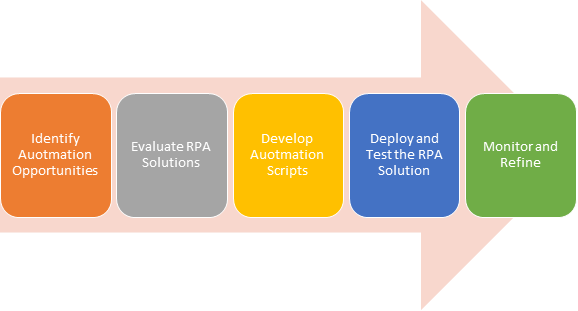
Implementing RPA successfully requires careful planning, preparation, and ongoing support. Here’s a step-by-step guide to getting started with RPA: 

Identify Automation Opportunities: Analyze business processes to identify repetitive, rules-based tasks that are well-suited for automation. 

Evaluate RPA Solutions: Research and evaluate different RPA software vendors and solutions to find the one that best meets your specific needs and budget. 

Develop Automation Scripts: Create detailed automation scripts that outline the steps involved in each task to be automated. 

Deploy and Test the RPA Solution: Deploy the RPA software and thoroughly test the automated processes to ensure accuracy and consistency. 

Monitor and Refine: Continuously monitor the performance of the RPA solution and make adjustments to the automation scripts as needed. 

Challenges and considerations 

Despite its numerous benefits, RPA also presents certain challenges that need to be considered: 

  • Identifying suitable automation candidates: It is crucial to carefully evaluate which processes are well-suited for automation. Not all tasks are suitable for RPA, and automating the wrong processes can lead to inefficiencies and wasted resources. 
  • Change management: Implementing RPA can involve significant changes to existing workflows and may require employee training and support. It is important to have a well-defined change management plan in place to ensure a smooth transition. 
  • Security and compliance: RPA systems handle sensitive data, so it is essential to implement robust security measures to protect against cyberattacks and data breaches. Additionally, organizations need to ensure compliance with relevant data privacy and regulatory requirements. 

Future of RPA is bright  

RPA is a rapidly evolving technology that is transforming the way businesses operate. By automating repetitive tasks, RPA can significantly improve productivity, reduce errors, and lower costs, enabling businesses to achieve their strategic goals and gain a competitive edge. As RPA technology continues to mature and its capabilities expand, it is poised to play an increasingly important role in the future of work. Embracing RPA can be a game-changer for businesses looking to stay ahead in the ever-evolving landscape of digital transformation. 

7-Steps-for-Faster-Data-Entry-in-SAP-S4HANA

7 Steps for Faster Data Entry in SAP S/4HANA 

In SAP S/4HANA, the “Quick Entry” screens, also known as fast data entry or fast entry, are designed to expedite data input for repetitive tasks. These screens are especially useful for users who frequently enter similar data, such as financial transactions or journal entries.  

By presenting data in a tabular format, Quick Entry screens enable users to input multiple line items or records at once, significantly reducing the time and effort required for data entry. Users can efficiently navigate through rows and columns, leverage default values, and even copy data from external sources, enhancing productivity and accuracy. This feature helps organizations save time and resources when handling routine data input tasks within the SAP S/4HANA system. 

Here’s how to use the Quick Entry screens for faster data input: 

Step-1: Accessing the Quick Entry Screen 

   – Log in to your SAP S/4HANA system with the appropriate user credentials. 

   – Open the SAP GUI or launch the Fiori app relevant to the task you want to perform. 

Step-2: Select the Transaction  

Identify the transaction code or Fiori app that corresponds to the task you want to complete. Transaction codes like FB50 (for posting journal entries) or specific Fiori apps are commonly used for this purpose. 

Step-3: Enter Data  

Once you’ve accessed the transaction or Fiori app, you’ll typically see a screen with fields to enter data. Here’s how to proceed: 

  • On the standard screen, you can either enter data field by field, which may be time-consuming for repetitive tasks. 
  • Instead, look for an option to switch to the “Quick Entry” mode or screen. In many cases, you can find this option by clicking a specific button or menu item, or it may be a preconfigured setting in a Fiori app. 

Step-4: Use Quick Entry Features 

In the Quick Entry mode, you’ll often find a table format where you can input multiple line items or records at once. The exact appearance and functionality may vary depending on the specific transaction or app. 

  • You can quickly enter data in rows and columns, which is particularly beneficial for tasks that involve multiple similar entries, like posting multiple journal entries. 
  • Navigate through rows and columns using keyboard shortcuts or the tab key for faster data input.  
  • Some apps may allow you to copy and paste data from external sources (e.g., Excel) directly into the Quick Entry table, which can significantly speed up data input. 
  • Utilize default values or templates if available to reduce manual data entry even further. 

Step-5: Validation and Submission 

  • Once the data is entered in the Quick Entry screen, review it for accuracy and completeness. 
  • Check for any data validation rules, and ensure that all mandatory fields are filled in correctly. 
  • Once you are satisfied with the data, submit or post the entries using the provided options in the Quick Entry screen. 

Step-6: Confirmation and Error Handling 

After submitting the data, you will receive confirmation of the successful completion of the task. In case of errors or exceptions, you will also be notified, and you can take appropriate actions to resolve them. 

7. Save and Exit:  

Don’t forget to save your work after the completion of the task and exit the Quick Entry screen or app. 

It may be noted that the availability and functionality of Quick Entry screens may vary depending on the specific transaction and customization of your SAP S/4HANA environment. It’s essential to consult your organization’s SAP documentation or seek guidance from your SAP administrator or consultant for transaction-specific instructions and training. 

Integrating-AI-and-Machine-Learning-with-UiPath-RPA

Integrating AI and Machine Learning with UiPath RPA 

In the ever-evolving landscape of business process automation, the combination of Robotic Process Automation (RPA) and Artificial Intelligence (AI) or Machine Learning (ML) is proving to be a game-changer. This dynamic integration not only enhances efficiency but also opens doors to more advanced and intelligent automation solutions. UiPath, a leading RPA platform, is at the forefront of this transformation, empowering organizations to harness the full potential of AI and ML in their automation initiatives. 

The Synergy Between RPA and AI/ML 

RPA, at its core, excels at automating rule-based, repetitive tasks. It mimics human actions by interacting with digital systems and applications to perform these tasks. While RPA offers significant benefits in terms of speed and accuracy, it becomes even more powerful when combined with AI and ML capabilities. 

Cognitive Automation: By integrating AI and ML algorithms, RPA bots can be trained to make decisions based on data patterns and insights. This enables them to handle complex, non-linear processes that involve unstructured data or decision-making tasks. 

Natural Language Processing (NLP): RPA can leverage NLP models to understand and process human language. This is especially valuable in scenarios like chatbots, customer support, and document analysis, where understanding and responding to natural language is essential. 

Data Extraction and Analysis: AI/ML algorithms can be used to extract valuable insights from large datasets, enabling organizations to make data-driven decisions. RPA can then automate the process of acting on these insights. 

Predictive Analytics: Integrating predictive models into RPA workflows allows organizations to forecast trends, optimize processes, and proactively address issues before they arise. 

Enhanced Customer Experience: AI-powered chatbots integrated with RPA can provide customers with instant responses and assistance, improving overall customer satisfaction. 

 UiPath’s Integration with AI and ML 

UiPath recognizes the significance of AI and ML in the future of automation and has made significant strides in integrating these technologies into its platform. 

  1. UiPath AI Center: UiPath’s AI Center provides a centralized platform for developing, deploying, and managing AI models. It offers a user-friendly interface for building custom AI models or integrating pre-trained models into RPA workflows. 
  1. UiPath AI Fabric: AI Fabric allows you to deploy AI models as reusable assets that RPA bots can call upon during automation tasks. This seamless integration enables bots to make real-time decisions based on AI insights. 
  1. UiPath Document Understanding: UiPath’s Document Understanding framework utilizes AI/ML to extract and process data from structured and unstructured documents, such as invoices, receipts, and contracts, streamlining data entry and validation processes. 

In conclusion, the synergy between RPA and AI/ML technologies holds immense potential for organizations seeking to enhance automation capabilities and drive digital transformation. Embrace this transformative combination to unlock a future of limitless automation possibilities. 

TecQubes as you partner for implementing UiPath RPA solutions 

As the world of automation becomes increasingly complex, organizations are seeking trusted partners to guide them through their RPA journeys. TecQubes, with its expertise in UiPath RPA solutions, is well-positioned to assist clients in realizing the full potential of RPA, AI, and ML integration. Having executed numerous projects in RPA Strategy Consulting, Custom AI Model Development, UiPath RPA Implementation and Training, TecQubes is ideally positioned to offer better solutions that go a long way in improving productivity, process optimization and reducing costs. UiPath’s commitment to integrating these technologies seamlessly, combined with TecQubes’ expertise, positions businesses to thrive in the age of intelligent automation.